When you watch movies about hacking, the hack is always seamless, things just work,those of us that have worked in this space know that is not the case. There are endless variables that can go wrong and cause the most simple of tasks to become a frustrating ordeal and it is not until you have done something a bunch of times that you understand the nuances of how to proceed. When I discovered the pwnagotchi—an AI-powered WiFi security tool that runs on a Raspberry Pi—I knew I had to build one. After using it for a few months I was... read more

Building a Cloud-Connected Pwnagotchi: From Raspberry Pi to AWS Lambda
When you watch movies about hacking, the hack is always seamless, things just work,those of us that have worked in this space know that is not the case. There are endless variables that can go wrong and cause the most simple of tasks to become a frustrating ordeal and it is not until you have done something a bunch of times that you understand the nuances of how to proceed. When I discovered the pwnagotchi—an AI-powered WiFi security tool that runs on a Raspberry Pi—I knew I had to build one. After using it for a few months I was frustrated with the process of having to manually download the pcap files and run hashcat myself. For a while I thought about how I wanted to take it further, I wanted it to communicate with me via my phone (like the Flipper Zero). I also wanted to be able to crack the handshakes automatically, but I did not want to have to deal with the effort of setting up and managing a cracking rig.
What if every WiFi handshake my pwnagotchi captured could automatically upload to the cloud? What if I could get real-time notifications on my phone and decide which networks to crack with a simple Telegram command? What if the cracking happened on AWS spot instances instead of my subpar laptop? This would save me time and effort of going back and forth to the device, copying files, and running hashcat on a device that is not nearly as powerful as some cloud instances.
What is a Pwnagotchi?
If you’re not familiar, a pwnagotchi is a “pet” that learns from WiFi networks around it. It’s built on a Raspberry Pi Zero and uses AI to optimize its handshake capture strategies. Think of it as a Tamagotchi for hackers—except instead of feeding it virtual food, you’re feeding it WiFi handshakes.
There are already great tutorials out there for building a basic pwnagotchi, so I won’t rehash the standard setup. I used jayofelony’s fork which includes updated plugins, better hardware compatibility, and active maintenance, this made the initial setup much smoother than the original.
Instead, this post focuses on what I added on top: a complete cloud pipeline for automated cracking.
The Hardware Stack
Let’s start with what I’m running:
-
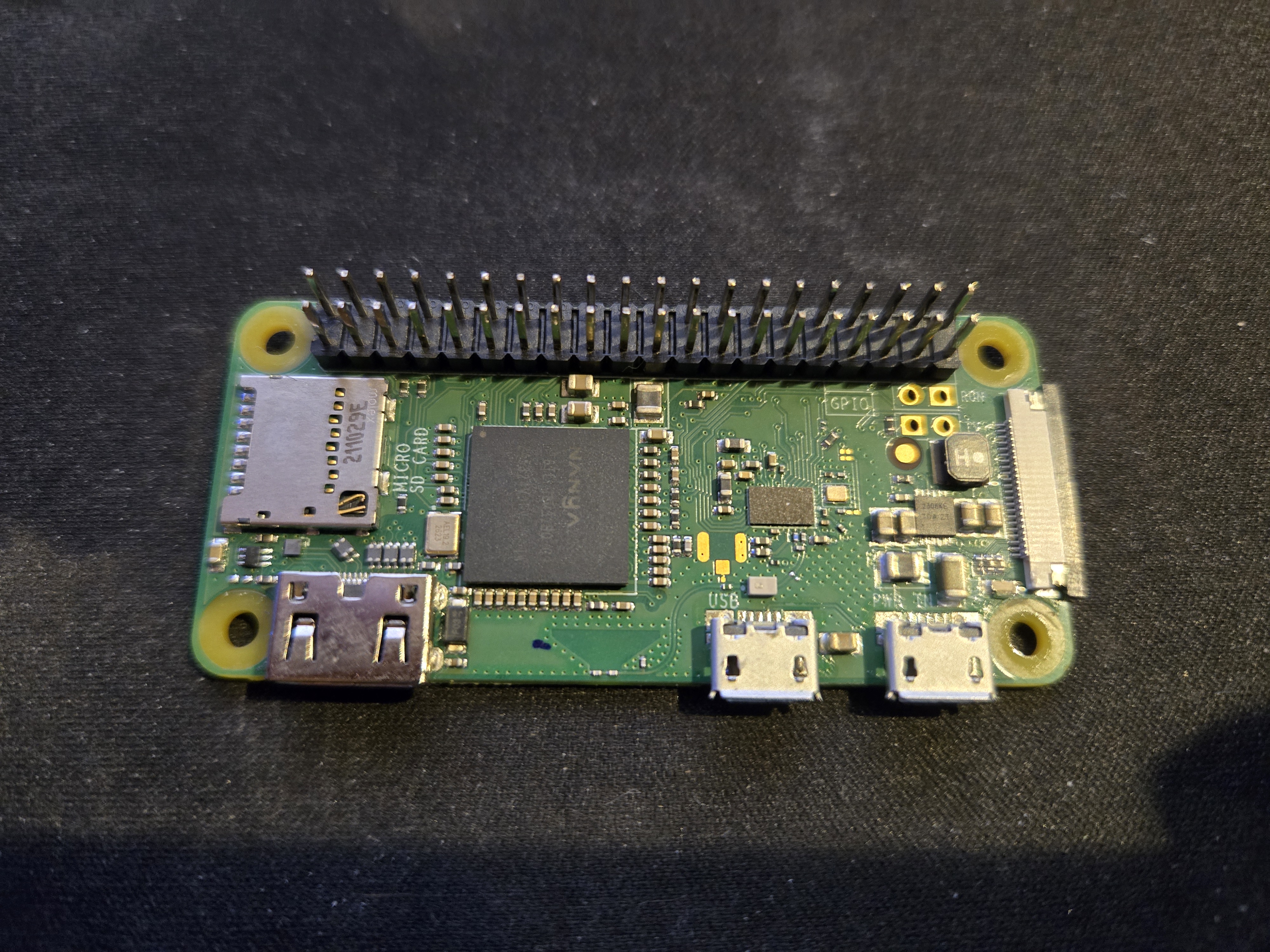
Raspberry Pi Zero WH – The brains of the operation
-
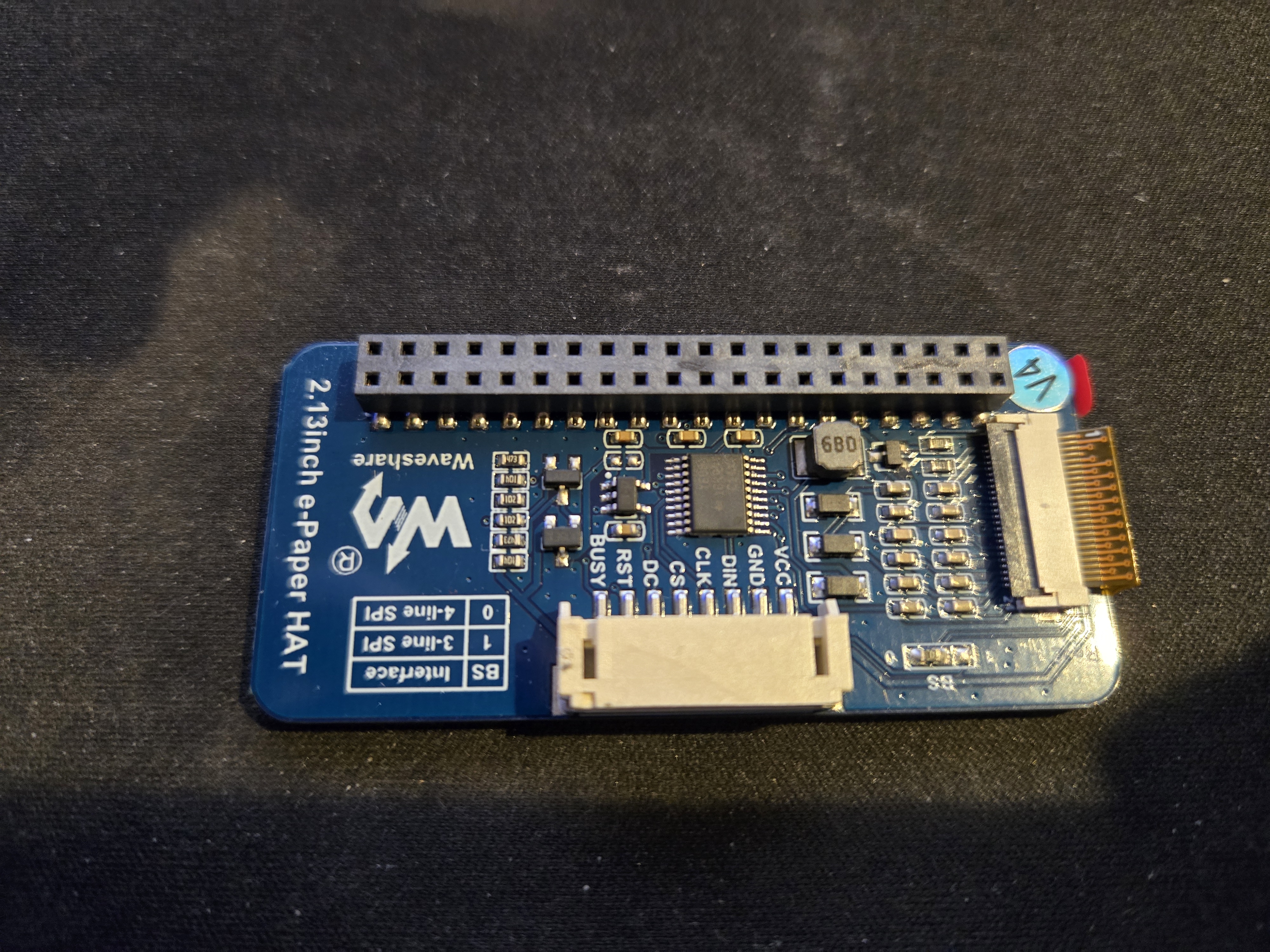
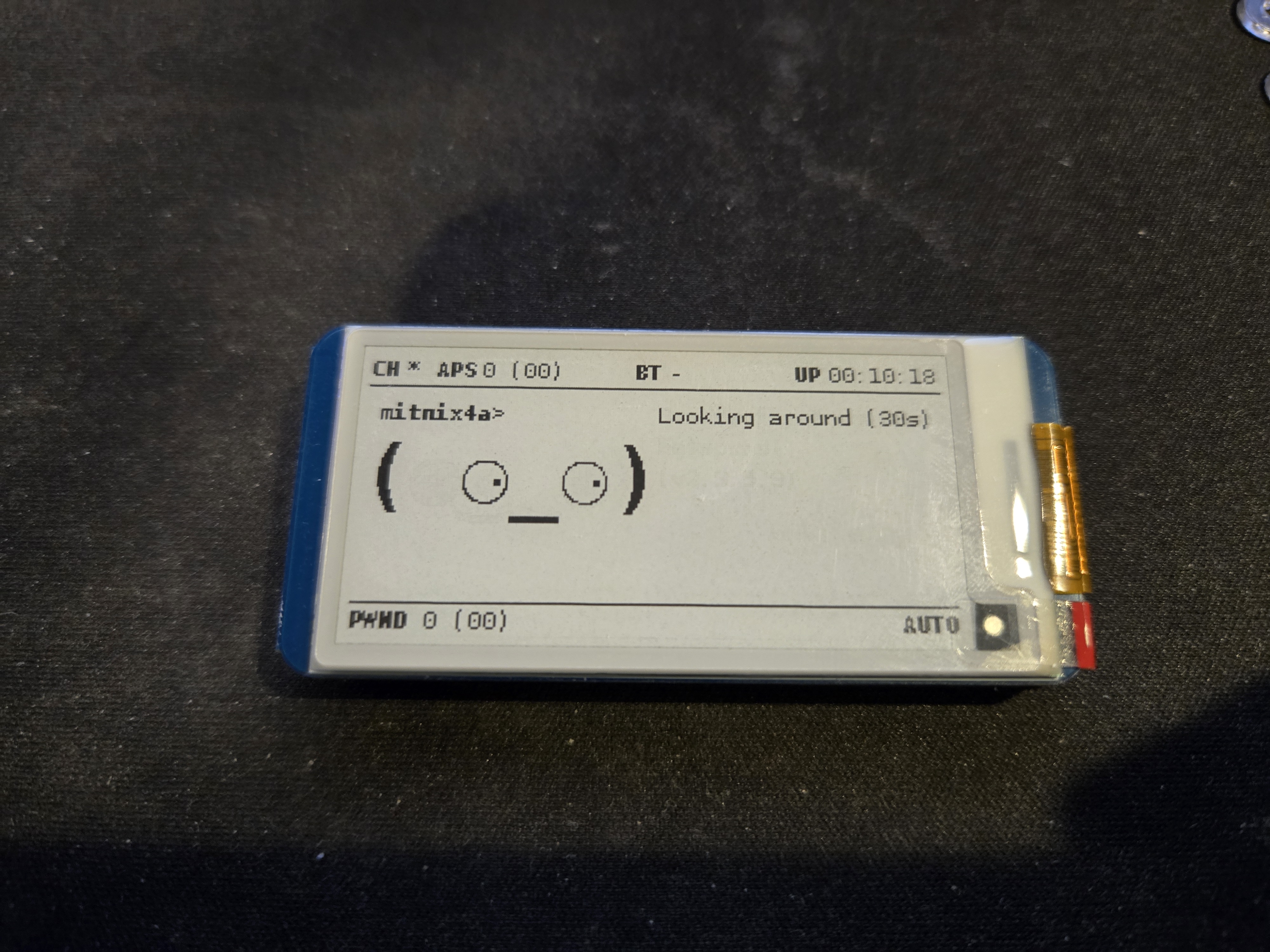
Waveshare 2.13” e-Paper Display (V4) – For that classic pwnagotchi face
-
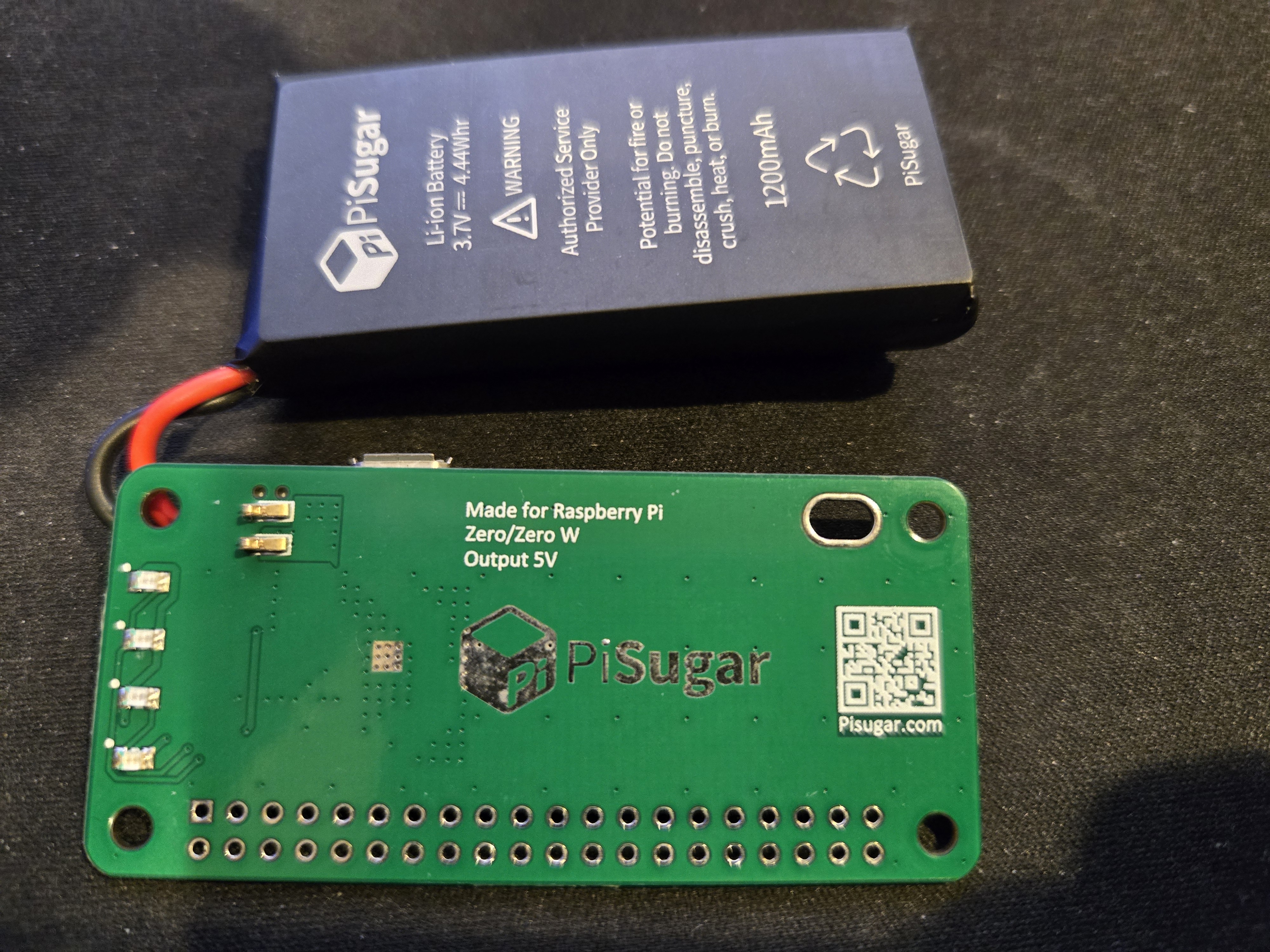
PiSugar Battery Module – Older V2 model, with 5V output.
-
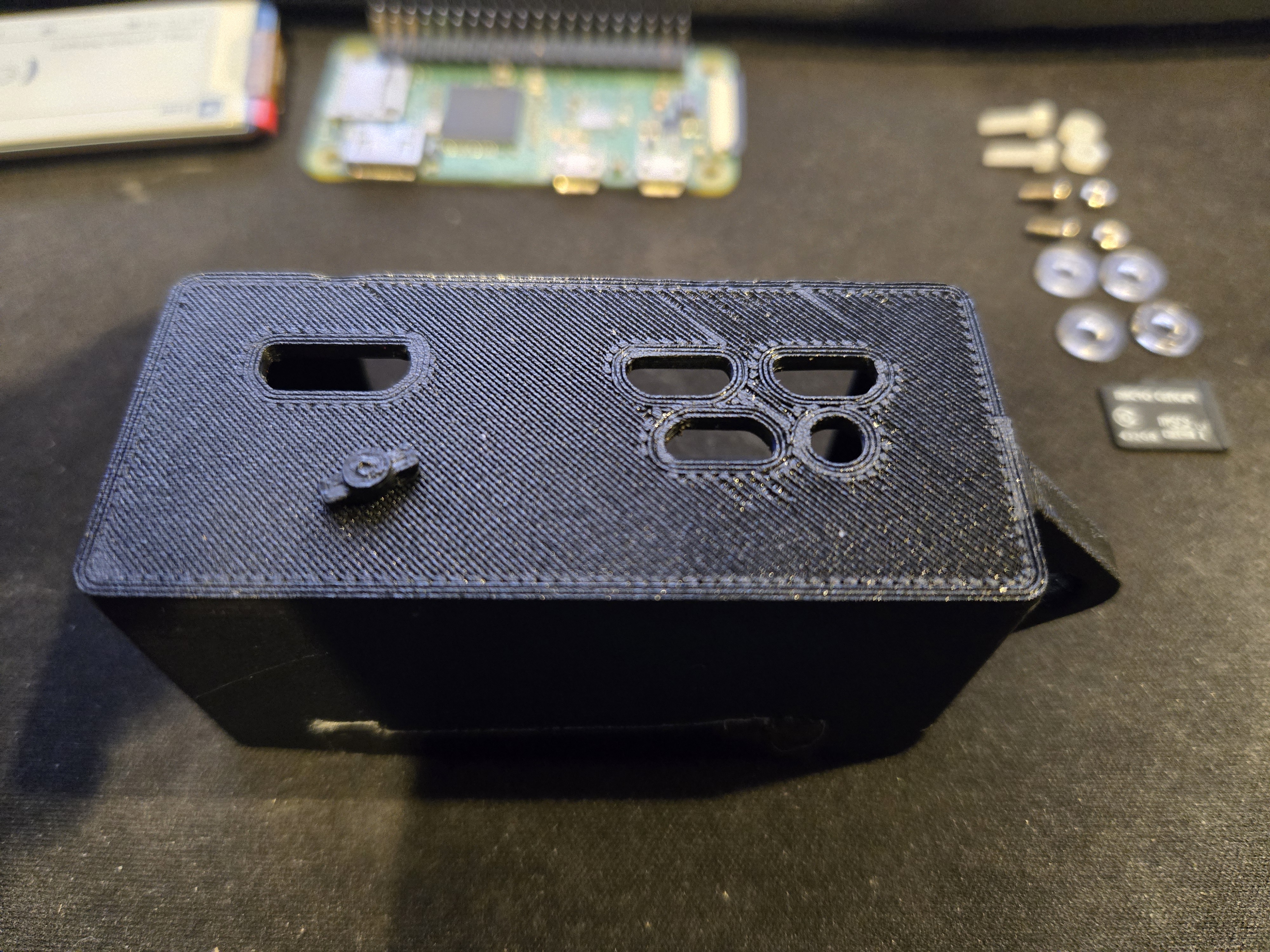
3D Printed Case with Button – Protection and style
-
Bluetooth Tethering – Connected to my phone for internet access
The Waveshare display is perfect for this project. It’s low power, highly visible even in sunlight, and gives the pwnagotchi that retro digital pet aesthetic, I love the faces this thing makes.
Assembly Tips
When it comes to the assembly, there are a few things that I think help. First, knowing when the pwnagotchi is booting is difficult with a case, but if you use the transparent nut/bolt that comes with the piSugar, it will magnify the green LED, which makes it much easier to see what is going on.
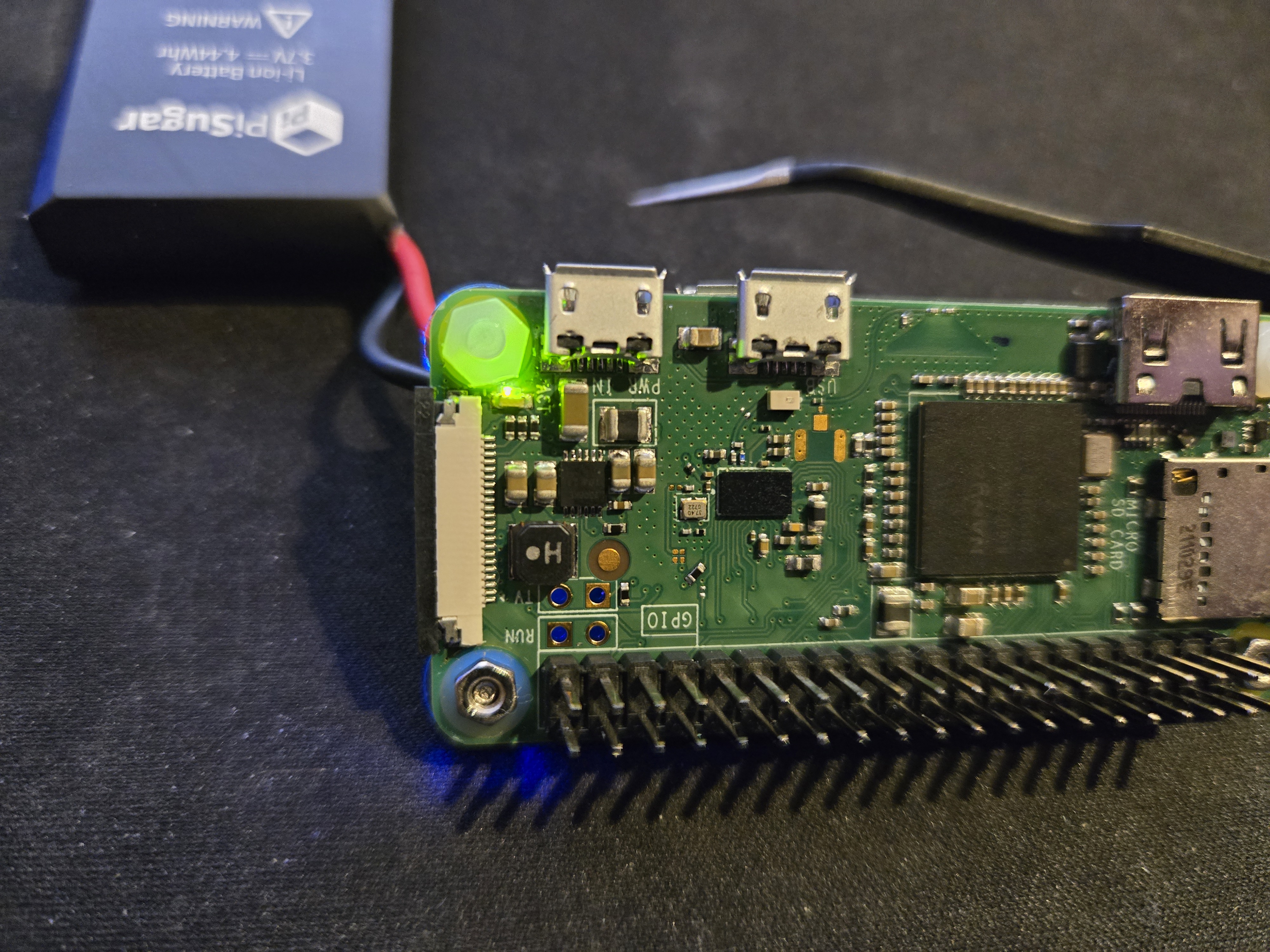
Second, I recommend using a 3D printed case. There are so many variations on the build that it’s best to find one that you like and print it out, I ended up going with PETG for the sake of durability, but PLA is fine for prototyping, in the images below you will see the PLA case I poorly printed during prototyping.
Third, ensure that you have a USB A to Micro USB with data transfer. Setting this up is infinitely easier when you can plug the Pi directly into your computer and see the console output, ssh into it, and SCP files back and forth.
The Architecture
Most pwnagotchi setups require you to manually SSH in, grab the PCAP files, and run hashcat yourself. There is a service that can be used to crack the pcap files, Distributed WPA PSK auditor, but I wanted a fully automated pipeline and a quicker turnaround.
Here’s how it works:
- Pwnagotchi captures a WiFi handshake and saves the PCAP file
- Custom S3 upload plugin automatically uploads the file to an S3 bucket’s
staging/folder - Lambda function triggers when a new file arrives it then sends a Telegram notification
- I receive a message on my phone with the network SSID, BSSID, and job ID
- I reply via Telegram with
/approve [job-id]or/reject [job-id](clicking on the approve or rejected link copies it to your clipboard) - Another Lambda function processes my command and moves the file to
approved/orrejected/ - A job launcher Lambda detects approved files and spins up an EC2 spot instance
- The EC2 instance runs GPU-accelerated hashcat with the rockyou wordlist
- Results are uploaded back to S3 and I get a Telegram notification with the cracked password
The entire system is serverless except for the short-lived EC2 instances that actually do the cracking. This keeps costs low, I only pay for compute when I’m actively cracking a handshake.
Code Deep Dive
Let me show you some of the key pieces. All the sensitive info has been replaced with placeholders, but you’ll get the idea.
Terraform: S3 Bucket Structure
The foundation of this system is a well-organized S3 bucket. I used Terraform to define the entire infrastructure as code:
# Main S3 bucket for storing pcap files
resource "aws_s3_bucket" "pcap_bucket" {
  bucket = local.bucket_name

  tags = merge(var.tags, {
    Name = "${local.name_prefix}-bucket"
  })
}

# Enable server-side encryption
resource "aws_s3_bucket_server_side_encryption_configuration" "pcap_bucket" {
  bucket = aws_s3_bucket.pcap_bucket.id

  rule {
    apply_server_side_encryption_by_default {
      sse_algorithm = "AES256"
    }
  }
}

# Block public access (security best practice)
resource "aws_s3_bucket_public_access_block" "pcap_bucket" {
  bucket = aws_s3_bucket.pcap_bucket.id

  block_public_acls       = true
  block_public_policy     = true
  ignore_public_acls      = true
  restrict_public_buckets = true
}

# Lifecycle policy to auto-delete old files
resource "aws_s3_bucket_lifecycle_configuration" "pcap_bucket" {
  bucket = aws_s3_bucket.pcap_bucket.id

  # Auto-delete completed pcaps after 30 days
  rule {
    id     = "delete-completed"
    status = "Enabled"

    filter {
      prefix = "completed/"
    }

    expiration {
      days = var.s3_lifecycle_expiration_days
    }
  }

  # Auto-delete rejected pcaps after 30 days
  rule {
    id     = "delete-rejected"
    status = "Enabled"

    filter {
      prefix = "rejected/"
    }

    expiration {
      days = var.s3_lifecycle_expiration_days
    }
  }
}
The folder structure is simple but effective:
staging/– New uploads go hereapproved/– Files I’ve approved for crackingprocessing/– Currently being crackedcompleted/– Finished jobsrejected/– Networks I chose not to crackresults/– Cracked passwords and job metadata
The lifecycle policies ensure I don’t pay for storage forever. Old files automatically delete after 30 days.
Lambda: Upload Handler
When a new PCAP file hits the staging/ folder, this Lambda function begins to work:
"""
Pwnagotchi PCAP Cracker - Upload Handler Lambda
Triggered when a new pcap is uploaded to S3 staging/ folder
Sends Telegram notification with approval/reject options
"""

import json
import os
import boto3
import urllib3
from datetime import datetime
import uuid

# Initialize AWS clients
s3 = boto3.client('s3')
http = urllib3.PoolManager()

# Environment variables (set in Lambda configuration)
TELEGRAM_BOT_TOKEN = os.environ['TELEGRAM_BOT_TOKEN']  # <YOUR_BOT_TOKEN>
TELEGRAM_CHAT_ID = os.environ['TELEGRAM_CHAT_ID']      # <YOUR_CHAT_ID>
S3_BUCKET = os.environ['S3_BUCKET']                    # <YOUR_BUCKET_NAME>


def extract_pcap_metadata(bucket, key):
    """
    Extract SSID and BSSID from pcap file
    For MVP: parse filename (format: SSID_BSSID.pcap)
    """
    filename = key.split('/')[-1]

    if '_' in filename and filename.endswith('.pcap'):
        parts = filename.replace('.pcap', '').split('_')
        if len(parts) >= 2:
            ssid = parts[0]
            bssid = '_'.join(parts[1:])
            return ssid, bssid

    # Fallback: use filename as SSID
    ssid = filename.replace('.pcap', '')
    bssid = 'unknown'
    return ssid, bssid


def send_telegram_message(message):
    """Send message to Telegram using Bot API"""
    url = f"https://api.telegram.org/bot{TELEGRAM_BOT_TOKEN}/sendMessage"

    payload = {
        'chat_id': TELEGRAM_CHAT_ID,
        'text': message,
        'parse_mode': 'Markdown'
    }

    response = http.request(
        'POST',
        url,
        body=json.dumps(payload).encode('utf-8'),
        headers={'Content-Type': 'application/json'}
    )

    if response.status != 200:
        raise Exception(f"Failed to send Telegram message: {response.status}")

    return json.loads(response.data.decode('utf-8'))


def lambda_handler(event, context):
    """Main Lambda handler"""
    for record in event['Records']:
        bucket = record['s3']['bucket']['name']
        key = record['s3']['object']['key']

        # Only process .pcap files in staging/
        if not key.startswith('staging/') or not key.endswith('.pcap'):
            continue

        # Generate unique job ID
        job_id = str(uuid.uuid4())[:8]

        # Extract metadata
        ssid, bssid = extract_pcap_metadata(bucket, key)

        # Format Telegram message
        message = f"""
🆕 *New Network Captured*

📡 *SSID:* `{ssid}`
🔗 *BSSID:* `{bssid}`
📦 *Job ID:* `{job_id}`
🕐 *Time:* {datetime.utcnow().strftime('%Y-%m-%d %H:%M:%S')} UTC

*Reply with:*
✅ `/approve {job_id}` - Start cracking
❌ `/reject {job_id}` - Ignore this network
"""

        # Send notification
        send_telegram_message(message)
        print(f"Telegram notification sent for job {job_id}")

    return {'statusCode': 200, 'body': 'Notifications sent'}
The beauty of this setup is that I get an instant notification every time my pwnagotchi catches a new network and updates while it goes through the steps. With a lot of companies sharing spaces or having a few floors of a building there is a huge chance that you will get multiple handshakes from neighboring networks, which you are not authorized to attack. By having the ability to approve or reject a network I can ensure that I am only cracking handshakes that I am authorized to crack.
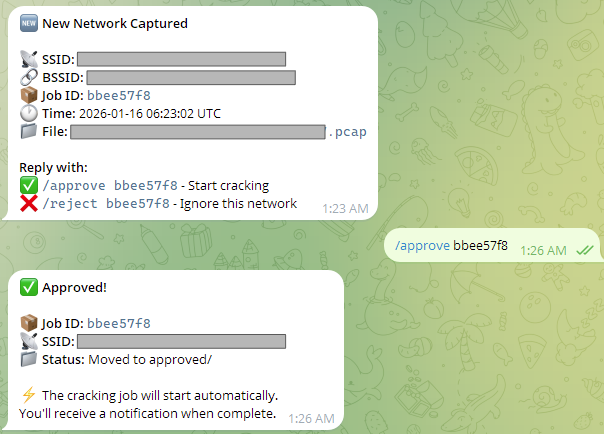
Here’s what the notification looks like when a new network is captured:
🆕 New Network Captured

📡 SSID: CoffeeShop_Guest
🔗 BSSID: a4:12:34:56:78:9a
📦 Job ID: f3a8b2c1
🕐 Time: 2026-01-28 14:32:15 UTC
📁 File: CoffeeShop_Guest_a4_12_34_56_78_9a.pcap

Reply with:
✅ /approve f3a8b2c1 - Start cracking
❌ /reject f3a8b2c1 - Ignore this network
I tap /approve f3a8b2c1 and get an immediate confirmation:
✅ Approved!

📦 Job ID: f3a8b2c1
📡 SSID: CoffeeShop_Guest
📁 Status: Moved to approved/

⚡ The cracking job will start automatically.
You'll receive a notification when complete.
A minute later, the EC2 instance spins up and I get a status update:
⚙️ Cracking Started

📦 Job ID: f3a8b2c1
📡 SSID: CoffeeShop_Guest
🖥️ Instance: i-0a1b2c3d4e5f6g7h8
⏱️ Status: Processing...

Running hashcat on g4dn.xlarge
Estimated time: 5-15 minutes
And finally, when the password is cracked:
🎉 Password Cracked!

📦 Job ID: f3a8b2c1
📡 SSID: CoffeeShop_Guest
🔓 Password: coffee2026

⏱️ Time taken: 8 minutes 32 seconds
💰 Cost: $0.42
📁 Full results saved to S3
Or, if it fails:
❌ Cracking Failed

📦 Job ID: f3a8b2c1
📡 SSID: CoffeeShop_Guest

Password not found in rockyou.txt wordlist.
⏱️ Time taken: 12 minutes
💰 Cost: $0.62

Try a different wordlist or move on to the next target.
This real-time feedback is very helpful because it lets me know exactly what is going on with the pipeline, and if there are any issues I can issue a /kill [job-id] command to terminate the EC2 instance and investigate what went wrong, and the pcap file is still in S3 so I can try again later if I want to.
Lambda: Telegram Webhook
This Lambda function acts as a webhook endpoint for the Telegram bot. When I send a command like /approve abc123, it processes the request and moves files around in S3:
def handle_approve(job_id, chat_id):
    """Handle /approve command"""
    print(f"Processing /approve for job {job_id}")

    # Find the job files
    pcap_key, json_key = find_job_by_id(job_id)

    if not pcap_key:
        send_telegram_message(
            f"❌ Job `{job_id}` not found. It may have already been processed.",
            chat_id
        )
        return

    try:
        # Move files from staging/ to approved/
        dest_pcap, dest_json = move_files('staging', 'approved', pcap_key, json_key)

        # Update metadata status
        metadata = update_metadata_status(dest_json, 'approved')

        # Send confirmation
        ssid = metadata.get('ssid', 'Unknown')
        message = f"""
✅ *Approved!*

📦 *Job ID:* `{job_id}`
📡 *SSID:* `{ssid}`
📁 *Status:* Moved to approved/

⚡ The cracking job will start automatically.
You'll receive a notification when complete.
"""
        send_telegram_message(message, chat_id)

    except Exception as e:
        send_telegram_message(f"❌ Error: {str(e)}", chat_id)
I also added /status and /kill commands. /status [job-id] shows where a job is in the pipeline, and /kill [job-id] terminates a running EC2 instance if I change my mind mid-crack or if it is taking too long.
Pwnagotchi Configuration
On the pwnagotchi side, the config is straightforward. Here’s a sanitized version of my config.toml:
# Basic device configuration
main.name = "[yourpwnagotchi]"
main.whitelist = [
    "[YourHomeNetwork]",
    "[YourNeighborsNetwork]"
]

# PiSugar battery support
main.plugins.pisugar2.enabled = true

# Bluetooth tethering to phone
main.plugins.bt-tether.enabled = true
main.plugins.bt-tether.share_internet = true
main.plugins.bt-tether.phone-name = "[YourPhone]"
main.plugins.bt-tether.phone = "android"
main.plugins.bt-tether.ip = "[YOUR:Phone:IP:Address]"
main.plugins.bt-tether.mac = "[YOUR:MAC:ADDRESS]"

# Waveshare display configuration
ui.display.enabled = true
ui.display.type = "waveshare_4"
ui.invert = true

# Web interface access (if you want to use the web interface)
ui.web.address = "0.0.0.0"
ui.web.username = "[admin]"
ui.web.password = "[your_secure_password]"
The S3 upload plugin I wrote isn’t included here, but it’s a simple Python script that watches the handshakes directory and uses boto3 to upload new PCAP files whenever they’re created.
The Cracking Pipeline
I didn’t include the actual cracking script code here (it’s basically a bash wrapper around hashcat), but here’s what happens:
- EC2 Spot Instance Launches – I use g4dn.xlarge instances with NVIDIA GPUs
- User Data Script Runs – Installs hashcat, aircrack-ng, and downloads the rockyou wordlist
- PCAP Conversion – Converts the PCAP to a hashcat-compatible format
- GPU-Accelerated Cracking – Runs hashcat with optimized settings
- Results Upload – If a password is found, it’s uploaded to S3
results/folder - Telegram Notification – I get a message with the cracked password (or a failure notice)
- Instance Terminates – No manual cleanup needed
The whole thing is cost-effective because spot instances are cheap and I’m only running them for minutes at a time. A typical cracking job costs less than dollar.
Community and Resources
If you’re interested in building your own pwnagotchi, here are some great resources:
- Official Site: pwnagotchi.ai – Start here for the basics
- jayofelony’s Fork: github.com/jayofelony/pwnagotchi
- Discord: The pwnagotchi community is active and helpful (Pwnagotchi Unofficial)
- Reddit: Several subreddits dedicated to WiFi security and pwnagotchi builds
Final Thoughts
This project taught me a lot about integrating hardware with serverless architecture. The pwnagotchi itself is a fun hardware hack, but connecting it to AWS Lambda, S3, and EC2 made it something that you can use regularly.
The key insight for me was this: you don’t need everything running 24/7. The pwnagotchi runs on battery. The S3 bucket just sits there. Lambda functions only charge for executions. EC2 instances spin up when needed and die when done.
It’s a model that works for a lot of side projects. Build the always-on parts cheap (or free), and use on-demand compute for the heavy lifting.
If you build something similar, I’d love to hear about it. And if you’re part of the pwnagotchi community, feel free to reach out, I’m always looking to learn new tricks.
Happy hacking! 🤖🔓